Push-button interface with feedback LED

The push-button interface is used to connect one or two potential-free N.O. push buttons or NPN transistor outputs to the Niko Home Control installation. The push-button interface has one feedback LED per input. This LED can be used as a control light or an orientation light.
Product details


Push-button interface for one or two inputs with warm white, high-intensity feedback LEDs
The push-button interface converts a switching pulse from an external push button (e.g. Niko Rocker, Niko Toggle en Niko Hydro) into a Niko Home Control bus command. The bus can be interconnected to the next control element of the Niko Home Control installation. The push-button interface has a feedback LED per input. This LED can be used as a control light or an orientation light. Note that if the interface is connected to only one button, the second LED will not be uased. The warm white high-intensity LED was especially designed for use in combination with Niko Rocker and Niko Toggle.
Specification description
Push-button interface for one or two inputs with warm white, high-intensity feedback LEDs
The push-button interface is used to connect one or two potential-free N.O. push buttons or NPN transistor outputs to the home automation installation.
- Only connect to a SELV contact (safety extra-low voltage)
- Maximum distance to the push button: 2 m
- Resting potential: 8 Vdc (SELV, safety extra-low voltage)
- Do not remove or replace the attached feedback LEDs
- Use in an outdoor environment only in combination with splash-proof housing
- Ambient temperature: -25 – +55 °C
- Weight: 16 g
- Dimensions (HxWxD): 41.5 x 27.9 x 5 mm
- Marking: CE
Related products
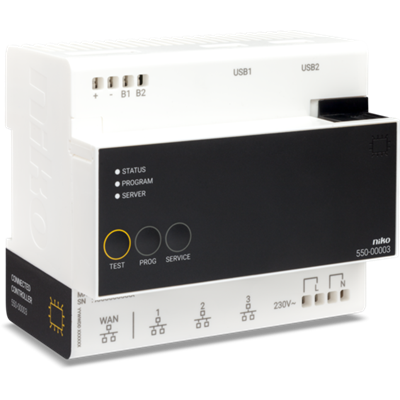
Connected controller for Niko Home Control II
The connected controller is the central module of every Niko Home Control installation for bus wiring. This module contains firmware that can only be programmed with the Niko Home Control programming software 2.1.1 or higher. It covers all basic functions on which a Niko Home Control installation is built. The basic functions include: • The intelligence directing the logic to the installation. Through the configuration software, the logic is saved locally on the controller. • The power supply module providing an input voltage of 26 V to the bus, the cabinet modules and the controls. Depending on the size of the installation, separate power supply modules can be added. • The connection to Niko Home Control IP devices such as touchscreens and external video units. A built-in router allows the user to connect up to 3 devices directly to the controller. With an extra switch, this number can be increased. • The connection to the internet. This enables the user to control the installation both indoors and outdoors (via mobile networks such as 3G, 4G, GPRS or Wi-Fi hotspot) using mobile devices (smartphones and tablets with iOS or Android). The module has a TEST button to verify the proper functioning and status of all other modules. Each installation must consist of one connected controller. After registration, your installation is connected, enabling control through the app via your smartphone and tablet, and you can enjoy the Niko services for upgrade or diagnosis of the installation.
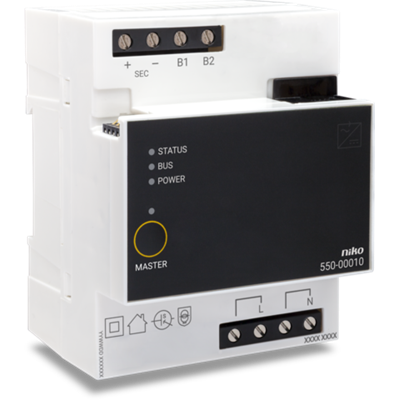
Power supply
The power supply, in combination with the connected controller, provides an extra input voltage of 26 V to the bus, modules and controls. An extra power supply is only necessary in installations for which the power of the built-in power supply of the connected controller is insufficient. Up to 2 extra power supplies can be connected to installations with a connected controller. The MASTER button is not used, as the built-in power supply of the connected controller is always the master. For more information on the required number of power supplies, you can consult the installation manual.

Rail coupler
This module is always mounted first on the left at the start of a new row of DIN rail modules that doesn't contain a connected controller or power supply. Interconnect the power supply and bus through the contacts at the top and bottom.