
With the launch of the Niko Home app version 2.25.1 and the Niko Home Control programming software version 2.25.1, we can proudly present to you the following upgrades.
This software release consists of two parts. Details about upgrade 2.25.2 will be shared on 24 February 2026, where we will release the new battery integration of Sungrow, Huawei, and SMA inverters, and stability improvements for the Easee EV charger connection.
-
The iconic Niko Rocker and Niko Toggle are now available as smart push buttons for Niko Home Control. They offer the same refined design, with a direct connection to the Niko Home Control bus interface on top. Each push button can be fully configured using the Niko Home Control programming software.
The Niko Rocker and Niko Toggle for Niko Home Control combine premium tactile quality with integrated sensing and elegant LED feedback for a serene user experience. Designed as dedicated smart interfaces, they integrate effortlessly into Niko Home Control to trigger lighting, ventilation, heating and more.
-
Niko Home Control, already compatible with the Renson Healthbox 3.0 (ventilation C type), now also supports the Flux+ ventilation series from Renson (ventilation D type), expanding your options for smart, connected ventilation.
-
The standby legislation is part of the European Ecodesign Directive, that oversees minimum standards for energy efficiency and durability.
Niko Home Control uses radios to communicate with its wireless devices. To save energy, it will only keep the radios on when needed. This was established in the standby regulation.
This means that when you’re adding or addressing new devices, all radios are turned on so the system can communicate with them.
When you’re not adding devices, radios that aren’t used by any configured device are switched off to save power.
-
When using solar charging mode to charge your car with excess PV energy, Niko Home Control will ask you for the minimum charging current of your car to activate charging at the right moment.
A lot of cars typically require 6 A per phase to start charging. This is the default value in Niko Home Control. Nowadays, this can vary to a minimum that’s lower or higher than 6 A. You will be able to easily adjust this starting value in the Niko Home app.
-
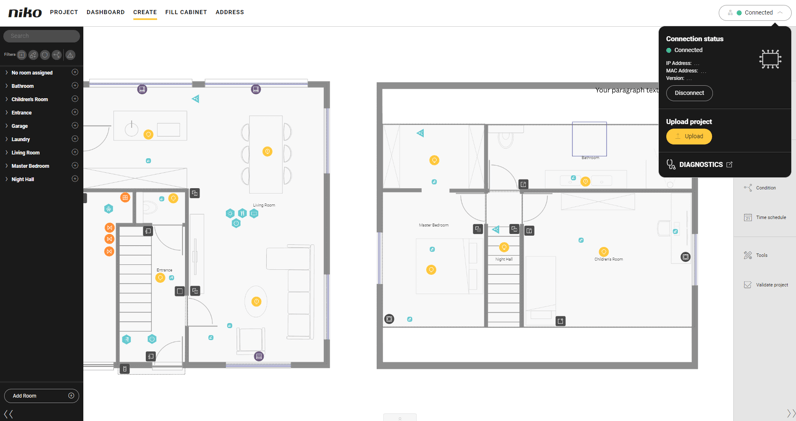
The new connection centre lets you choose whether or not to connect to the connected controller or the wireless smart hub. This is especially useful for installations that are intentionally split.
You can now work offline or selectively connect to a connected controller or smart hub, avoiding constant update prompts. Instead of a trigger to connect, you now see a clear connection status: “connected”, or “not connected” at the top right of your programming interface.
Not only can you switch between connected controllers and smart hubs, you can also switch between projects without closing the software.
In the same menu, you can start the upload to the respective connected controller or smart hub. As such, this new function replaces the existing “Upload” button. The diagnostics page is now also directly accessible from the connection centre menu.
This upgrade will benefit installers with larger installation projects, thanks to
- an improved start-up time because there is no automatic connection at the start-up,
- and increased flexibility thanks to manual connection options.
Read more about the software upgrade
Download the latest version of the Niko Home app
Partners
Discover which partner systems can be integrated into Niko Home Control systems